Connectivity Features
| 3G |
|
| Bluetooth Version |
|
| USB |
|
| Wi-fi Version |
- Wi-Fi 6E (802.11ax) with 2×2 MIMO
|
| Other Connectivity Features |
|
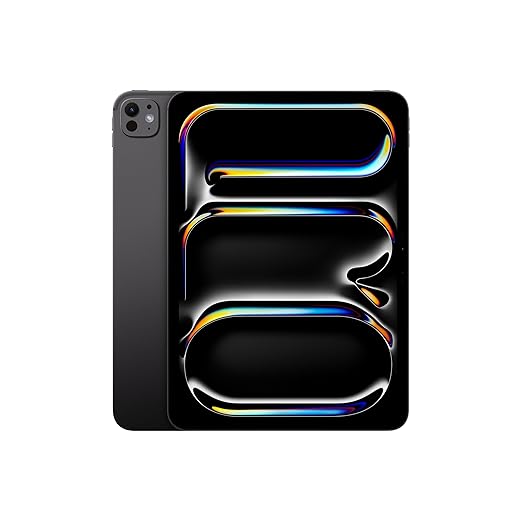
In the world of digital creativity, having a reliable and versatile drawing tablet with screen is essential for professionals, students, and hobbyists alike. The Apple iPad Pro 11″ (M4, Space Black, 256GB) has redefined what it means to combine power, portability, and precision in a single device. Whether you are an illustrator, graphic designer, or 3D modeler, this iPad Pro provides a platform that is both inspiring and highly functional, making it one of the most sought-after drawing tablets with screen in the creative industry.
The iPad Pro’s design philosophy balances elegance with practicality. Its slim, lightweight frame allows artists to work anywhere—from professional studios to coffee shops—while its stunning display ensures that every stroke, color, and detail is rendered with incredible clarity. This combination of portability and visual fidelity positions the iPad Pro as not just a tablet, but a professional-grade drawing tablet with screen that rivals traditional desktop alternatives.
Why the Apple iPad Pro 11″ is Considered a Drawing Tablet with Screen
Unlike traditional tablets that require an external monitor or input device, the iPad Pro offers a seamless integrated solution. The high-resolution Liquid Retina XDR display, combined with Apple Pencil support, allows users to draw, sketch, and design directly on the screen with remarkable precision. The result is an experience that closely mimics pen-on-paper creativity, making it an ideal drawing tablet with screen for digital artists.
Some key benefits include:
-
Natural Drawing Experience: Pressure sensitivity and tilt recognition allow for realistic strokes.
-
High-Fidelity Colors: Ultra-wide color gamut and True Tone technology enhance color accuracy.
-
Responsive Touch Input: Multi-touch capabilities ensure smooth, lag-free interaction.
These features make it clear why the iPad Pro is a premium drawing tablet with screen, preferred by creative professionals worldwide.
Who Can Benefit from This Drawing Tablet with Screen
The Apple iPad Pro 11″ caters to a wide range of users:
-
Graphic Designers: Create vector art, logos, and illustrations with professional tools.
-
Digital Artists & Illustrators: Use apps like Procreate and Adobe Fresco to draw, paint, and animate.
-
Students & Educators: Perfect for note-taking, interactive learning, and creative assignments.
-
Architects & Engineers: Sketch blueprints, design 3D models, and annotate plans efficiently.
-
Photographers & Videographers: Edit images and videos on-the-go with precise touch controls.
With its drawing tablet with screen capabilities, the iPad Pro offers versatility that satisfies both casual creatives and professionals working at the highest level.
Design and Build Quality
The Apple iPad Pro 11″ (M4) embodies elegance and functionality, making it a premium drawing tablet with screen that combines style, durability, and portability.
Sleek Space Black Finish
The Space Black color gives the iPad Pro a professional and modern aesthetic. The smooth matte finish not only looks elegant but also resists fingerprints and smudges, which is essential for artists who frequently touch the screen while drawing.
Slim and Lightweight Design
Weighing just under 500 grams, this iPad Pro is extremely portable. Its slim profile allows users to carry it easily in backpacks or tablet sleeves, making it ideal for creative professionals on the go. Whether you are commuting, traveling, or working from a coffee shop, this drawing tablet with screen is designed to be effortlessly portable without compromising screen size or functionality.
Durable Build Quality
-
Constructed from premium aluminum, the body is robust yet lightweight.
-
The scratch-resistant glass ensures longevity even with regular use of the Apple Pencil.
-
Rounded edges and precision machining provide comfort during prolonged use, which is critical for illustrators and designers working on detailed projects.
Ergonomics for Long Sessions
Apple has meticulously designed the iPad Pro so that it can be held comfortably in one hand or propped up using accessories like the Magic Keyboard or a stand. The balanced weight distribution prevents fatigue, making it ideal for long drawing or editing sessions.
Minimalist and Professional Look
Unlike traditional tablets that can appear bulky or industrial, the iPad Pro’s streamlined design ensures it blends seamlessly into professional studio environments. Its understated elegance emphasizes its role as both a creative tool and a professional accessory.
In conclusion, the Apple iPad Pro 11″ stands out as a drawing tablet with screen that merges premium build quality, ergonomic design, and portability, allowing artists to focus on creativity rather than hardware limitations.
Ultra Retina XDR Display – Perfect for Digital Artists
A key feature that makes the iPad Pro a top-tier drawing tablet with screen is its Ultra Retina XDR Display, delivering unmatched clarity, color accuracy, and responsiveness.
Brilliant Visual Fidelity
The 11-inch Liquid Retina XDR display offers high brightness, deep blacks, and vibrant colors, creating a canvas that brings every drawing and illustration to life. For digital artists, this means:
-
Precise color representation for professional projects.
-
Accurate shading and gradient work.
-
True-to-life preview of work for both digital and print outputs.
High Resolution and Pixel Density
The display provides extremely high pixel density, ensuring that every line drawn with the Apple Pencil appears sharp and crisp. Whether sketching fine details or designing large-scale illustrations, this drawing tablet with screen maintains exceptional clarity.
ProMotion and Multi-Touch Technology
-
ProMotion technology provides a 120Hz refresh rate, resulting in smooth scrolling, drawing, and responsiveness.
-
Multi-touch gestures allow seamless navigation and editing, enabling a natural workflow for artists and designers.
True Tone and Wide Color Support
-
True Tone adjusts the screen’s color temperature based on ambient lighting for consistent visuals.
-
Wide P3 color gamut ensures vivid and accurate colors, crucial for professional artwork and photo editing.
Apple Pencil Integration
The display is fully optimized for the Apple Pencil, offering:
-
Tilt and pressure sensitivity, allowing nuanced brush strokes.
-
Palm rejection, ensuring your hand resting on the screen doesn’t interfere with your work.
-
Lag-free input, making drawing feel instantaneous and natural.
In essence, the Ultra Retina XDR Display elevates the iPad Pro into a professional-grade drawing tablet with screen, capable of meeting the rigorous demands of creative professionals and digital artists.
Performance – Apple M4 Chip
The Apple iPad Pro 11″ (M4) is powered by the Apple M4 chip, making it one of the most powerful drawing tablets with screen available.
-
CPU and GPU Power: The 8-core CPU and 10-core GPU deliver blazing-fast performance for intensive apps such as Procreate, Adobe Photoshop, and LumaFusion.
-
Seamless Multitasking: Artists can run multiple apps simultaneously—reference images, design software, and editing tools—without lag.
-
Real-Time Rendering: 3D modeling, animation, and high-resolution video editing are handled efficiently, offering a desktop-class experience on a portable device.
With the M4 chip, the iPad Pro ensures smooth performance even for complex creative projects, making it a professional-grade drawing tablet with screen.
Advanced AR and 3D Capabilities
The Apple iPad Pro 11″ (M4) is more than a drawing tablet; it’s a powerhouse for augmented reality (AR) and 3D creative work.
-
LiDAR Scanner: Measures depth with remarkable accuracy, allowing designers and architects to create immersive 3D models.
-
AR Apps: Compatible with ARKit-based apps, making it ideal for visualizing designs in real-world environments.
-
3D Modeling: Professionals can sculpt and manipulate complex 3D objects, turning the iPad Pro into a creative 3D studio.
Artists and engineers alike benefit from these features, solidifying the iPad Pro’s role as a drawing tablet with screen that bridges 2D and 3D workflows.
Entertainment and Multimedia
While primarily designed for creative work, the iPad Pro doubles as a premium media device:
-
High-Fidelity Audio: Four-speaker audio system with wide stereo sound for music production and video playback.
-
Video Editing: Compatible with iMovie and LumaFusion for high-resolution video editing on the go.
-
Streaming & Gaming: Apple Arcade and high-end games run smoothly, taking advantage of the M4 chip.
This versatility ensures the iPad Pro serves both professional and recreational purposes, making it a well-rounded drawing tablet with screen.
Collaborative Creativity
The iPad Pro supports real-time collaboration, which is essential for modern creative teams:
-
Cloud Collaboration: iCloud Drive allows multiple users to edit and annotate projects simultaneously.
-
Screen Sharing: FaceTime and collaborative apps enable live demonstrations and feedback sessions.
-
Cross-Device Workflow: Works seamlessly with Macs and other iPads, integrating with Apple’s ecosystem for collaborative design projects.
Artists and teams can now use the iPad Pro as a networked drawing tablet with screen, fostering creativity without boundaries.
Education and Professional Training
The iPad Pro is also ideal for educational purposes:
-
Digital Notetaking: Apple Pencil enables handwriting recognition and interactive notes.
-
Interactive Learning: Compatible with AR-based educational apps for immersive lessons.
-
Professional Training: Art schools, design academies, and universities utilize it as a drawing tablet with screen for workshops and live demonstrations.
Its combination of portability, performance, and interactive display makes it a tool of choice for students and educators.
Storage Options and Memory
The 256GB storage variant balances space and performance, ideal for digital creators:
-
Ample Storage: Enough room for large design files, multiple apps, videos, and artwork.
-
High-Speed Memory: Ensures quick loading of apps and seamless operation during multitasking.
-
Expandable Workflow: With iCloud and external storage options via USB-C/Thunderbolt, users can store and access large projects easily.
This makes the iPad Pro a versatile drawing tablet with screen for both personal and professional use.
Camera System – 12MP Front and Back, LiDAR Scanner
The iPad Pro features advanced cameras, enhancing both creative workflows and AR applications:
-
12MP Rear Camera: Perfect for scanning documents, capturing textures, or photographing reference material for digital art.
-
12MP Front Camera: Ideal for video calls, virtual classes, or live streaming.
-
LiDAR Scanner: Measures depth for augmented reality applications, architectural visualization, and interactive design projects.
These features enhance the drawing tablet with screen functionality by combining visual input with creative output seamlessly.
Apple Pencil and Drawing Tablet Features
Apple Pencil compatibility transforms the iPad Pro into a professional drawing tablet with screen:
-
Pressure and Tilt Sensitivity: Enables fine control over line thickness, shading, and brush angles.
-
Lag-Free Input: Makes drawing feel natural, closely mimicking traditional pen-and-paper techniques.
-
Palm Rejection: Ensures hands resting on the screen don’t interfere with work.
The iPad Pro + Apple Pencil is widely recognized as a premium drawing tablet with screen for artists and designers.
Connectivity – Wi-Fi 6E, Face ID, USB-C
Connectivity features enhance workflow efficiency:
-
Wi-Fi 6E: Provides ultra-fast internet speeds for cloud-based storage, downloads, and collaboration.
-
Face ID: Secure and convenient login.
-
USB-C/Thunderbolt: Fast file transfers and compatibility with external monitors, drives, and accessories.
These features make the iPad Pro an effective drawing tablet with screen for collaborative and remote work.
Battery Life and Portability
-
All-Day Battery Life: Up to 10–12 hours of continuous use for drawing, editing, or browsing.
-
Portable Charging: USB-C charging ensures compatibility with portable power banks.
-
Lightweight Design: Easily carried to studios, classrooms, or client meetings.
The combination of battery efficiency and portability reinforces its status as a professional drawing tablet with screen.
Operating System and Software Compatibility
-
iPadOS: Optimized for multitasking, split-screen functionality, and creative apps.
-
Creative Apps: Supports Procreate, Adobe Photoshop, Illustrator, Affinity Designer, and more.
-
App Store Integration: Access thousands of apps designed for professional digital creation.
This makes the iPad Pro the ultimate drawing tablet with screen for artists, designers, and content creators.
Real-Life Use Cases for Professionals
-
Illustrators and Graphic Designers: Create high-quality digital art with precision.
-
Architects and Engineers: Annotate drawings, use AR tools, and sketch plans.
-
Students and Educators: Take notes, annotate PDFs, and participate in virtual learning.
-
Photographers and Videographers: Edit high-resolution images and videos on the go.
Its versatility solidifies the iPad Pro as a top drawing tablet with screen for all professional needs.
Comparison with Other Drawing Tablets with Screen
Compared to Wacom Cintiq and other tablets:
-
Portability: iPad Pro is lighter and easier to carry.
-
Display Quality: Ultra Retina XDR display with color accuracy surpasses many competitors.
-
Performance: M4 chip provides desktop-level performance in a portable form.
-
Versatility: Functions as a tablet, laptop companion, and drawing device.
The iPad Pro clearly leads as a premium drawing tablet with screen.
Accessories and Expansion
Enhance the iPad Pro experience:
-
Apple Pencil 2nd Gen: Essential for precise drawing.
-
Magic Keyboard: Converts the iPad into a mini-laptop for productivity.
-
External Drives & Hubs: Extend storage and connectivity for professional workflows.
Accessories transform the iPad Pro into a complete creative ecosystem, elevating it beyond a basic drawing tablet with screen.
Durability and Reliability
-
Aluminum Chassis: Lightweight yet strong.
-
Scratch-Resistant Display: Protects the Ultra Retina XDR screen.
-
Apple Ecosystem: Updates, software support, and compatibility with accessories ensure long-term reliability.
Artists can rely on it as a durable and professional drawing tablet with screen.
User Reviews and Testimonials
Positive Feedback:
-
Exceptional display quality and color accuracy.
-
Smooth Apple Pencil performance.
-
Lightweight and portable for creative work anywhere.
Minor Drawbacks:
Users overwhelmingly regard it as the best drawing tablet with screen for professionals.
FAQ Examples:
-
Q: Can I use this iPad Pro for professional illustration?
A: Yes, it is one of the leading drawing tablets with screen for professional use.
-
Q: Does it support multi-layered artwork?
A: Yes, apps like Procreate handle multiple layers seamlessly.
Pros:
-
Stunning Ultra Retina XDR display.
-
Powerful M4 chip for seamless multitasking.
-
Full Apple Pencil support with tilt and pressure sensitivity.
-
Long battery life and portability.
Cons:
Final Verdict:
The Apple iPad Pro 11″ (M4, 256GB, Space Black) is a premium drawing tablet with screen that combines portability, performance, and creative flexibility. Its high-quality display, Apple Pencil integration, and robust hardware make it a top choice for digital artists, designers, and professionals seeking professional-grade drawing capabilities on a versatile tablet.



Reviews
There are no reviews yet.